
InOut: Time Tracker2.14.0 - App Store
You'll be able to see results in few seconds.
Publisher Description

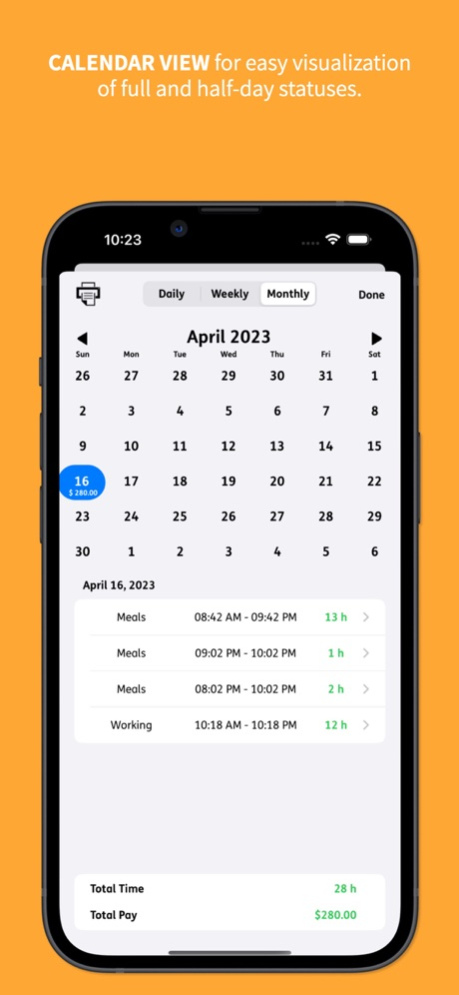
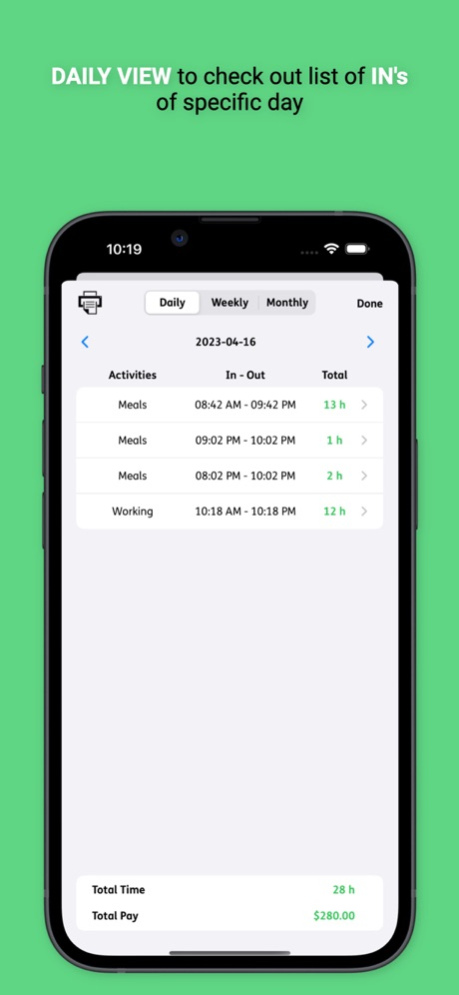

Introducing InOut - Time Tracker, the ultimate solution for effortlessly managing your office hours! Our user-friendly app simplifies tracking your check-ins and check-outs, helping you stay on top of your work life. With a sleek calendar-like interface and a host of powerful features, InOut - Time Tracker is your go-to app for streamlining daily routines.
Key Features:
* One-tap check-in and check-out for seamless time tracking
* Calendar view for easy visualization of full and half-day statuses
* Set week start day and customize full day and half day working hours
* Comprehensive daily, weekly, and monthly log views
* Export reports with employee details for convenient record keeping
* Passcode security to protect your personal data
* Set reminders to check in/out on time
* Backup data using export and import options
* Dark mode support for improved visibility in low-light environments
Additional Benefits:
* Intuitive design and easy-to-use interface for busy professionals
* Customize your calendar with different colors and themes to match your style
* Gain insights into your work patterns and trends with statistics
* Sync data across multiple devices using our sharing option
* Receive timely notifications and alerts to stay on track
* Flexible settings to accommodate various work environments and schedules
* Share your progress and achievements with colleagues and friends
* Regular updates and new features to enhance your experience
Experience the ease of office hour management with InOut - Time Tracker and revolutionize the way you track your work life. Download now and take the first step towards a more organized and efficient professional life! With such feature-packed goodness, InOut - Time Tracker is your ultimate time management companion. Get started today and see the difference it can make in your work life!
Sep 9, 2023
Version 2.14.0
Set reminder fixes and user experience improvement
About InOut: Time Tracker
The company that develops InOut: Time Tracker is Tirupati Balan. The latest version released by its developer is 2.14.0.
To install InOut: Time Tracker on your iOS device, just click the green Continue To App button above to start the installation process. The app is listed on our website since 2023-09-09 and was downloaded 0 times. We have already checked if the download link is safe, however for your own protection we recommend that you scan the downloaded app with your antivirus. Your antivirus may detect the InOut: Time Tracker as malware if the download link is broken.
How to install InOut: Time Tracker on your iOS device:
- Click on the Continue To App button on our website. This will redirect you to the App Store.
- Once the InOut: Time Tracker is shown in the iTunes listing of your iOS device, you can start its download and installation. Tap on the GET button to the right of the app to start downloading it.
- If you are not logged-in the iOS appstore app, you'll be prompted for your your Apple ID and/or password.
- After InOut: Time Tracker is downloaded, you'll see an INSTALL button to the right. Tap on it to start the actual installation of the iOS app.
- Once installation is finished you can tap on the OPEN button to start it. Its icon will also be added to your device home screen.
Program Details
System requirements
Download information
Pricing
Version History
version 2.14.0
posted on 2023-09-09
Sep 9, 2023
Version 2.14.0
Set reminder fixes and user experience improvement
version 2.12.0
posted on 2023-09-07
Sep 7, 2023
Version 2.12.0
Minor bug fixes and UI improvements.
version 2.11.0
posted on 2023-04-17
Apr 17, 2023
Version 2.11.0
Thanks for using InOut - Time Tracker!
To make our app better for you, we bring updates to the store regularly.
This update of our InOut - Time Tracker app includes improvements in speed and reliability.
version 2.8.0
posted on 2023-04-03
Apr 3, 2023
Version 2.8.0
We're excited to bring you the latest version of our app, packed with new features and improvements!
Home Screen Optimization: We've optimized the home screen to give you quick access to all the features you need, including your work hours and check-in/out buttons.
Redesigned as per Human Interface Guidelines: We've redesigned the app to follow Apple's Human Interface Guidelines, making it easier and more intuitive to use.
Dark Mode Support: We've added support for Dark Mode, so you can use the app comfortably in any lighting conditions.
We hope you enjoy these new features and improvements. As always, we're here to support you in any way we can. Thank you for using our app!er human interface guideline
version 2.4.0
posted on 2020-05-18
May 18, 2020 Version 2.4.0
- Check in time reset problem during app exit
- Minor bug fixes
version 2.4.0
posted on 2020-05-18
18 May 2020 Version 2.4.0
- Check in time reset problem during app exit
- Minor bug fixes
version 2.1.0
posted on 2018-04-15
Apr 15, 2018 Version 2.1.0
- UI/UX improvements and bug fixes
version 2.0.0
posted on 2012-08-31
version 2.4.0
posted on 1970-01-01
2020年5月18日 Version 2.4.0
- Check in time reset problem during app exit
- Minor bug fixes
version 2.4.0
posted on 1970-01-01
18. Mai 2020 Version 2.4.0
- Check in time reset problem during app exit
- Minor bug fixes
Disclaimer
Official App Store Link
We do not host InOut: Time Tracker on our servers. We did not scan it for viruses, adware, spyware or other type of malware. This app is hosted by Apple and passed their terms and conditions to be listed there. We recommend caution when installing it.
The App Store link for InOut: Time Tracker is provided to you by apps112.com without any warranties, representations or guarantees of any kind, so access it at your own risk.
If you have questions regarding this particular app contact the publisher directly. For questions about the functionalities of apps112.com contact us.
